How to Turn a Video Transcript Into SEO Content
By the YumiLM Team
Search engines can't watch a video. They can read a title, a description, a handful of tags, and whatever surrounding text sits on the page, but the spoken content itself, the actual substance of a 20-minute interview or tutorial, is invisible to a crawler unless it exists somewhere as text. A transcript is that text. Publishing one alongside a video, or repurposing it into a standalone article, is one of the few genuinely reliable ways to make long-form spoken content indexable, quotable, and citable, both by traditional search and by the AI systems now summarizing search results directly.
This isn't a new idea, and it isn't a growth hack. It's closer to a basic fix for a structural gap: video carries an enormous amount of information that text-based search infrastructure can't parse directly. Everything below is about closing that gap properly, not about stuffing keywords into a wall of unedited speech.
Key Takeaways
| Point | Details |
|---|---|
| Search engines rely on text to understand a video page | Google's video SEO guidance centers on giving crawlers text that describes the video, a title, a description, structured data, and the page around it. A transcript puts the spoken content itself into that text. |
| A transcript can be worth thousands of words of content | A 20 to 30 minute video easily contains 3,000 to 4,500 spoken words, roughly a full long-form blog post's worth of text and topical signal, once it exists as a transcript rather than locked inside an audio track. |
| The most-quoted ranking number is secondhand | Video SEO articles (e.g. 3Play Media) repeat a figure of roughly 16% higher rankings and 16% more revenue for 37 pages after transcripts were added, usually attributed to Liveclicker. We could not locate the original study, so treat it as a directional, vendor-reported number. |
| A publisher case study points the same way | 3Play Media's case study on This American Life reports that 4.18% of all unique visitors landed on the site through a transcript page, and attributes a 6.68% increase in search traffic to the transcripts. |
| Dumping a raw transcript onto a page is the weak version of this | An unedited transcript is better than nothing, but a lightly structured article, headings, a short intro, the transcript's own natural sub-topics turned into sections, gives both readers and crawlers something far more useful than a solid block of dialogue. |
| YumiLM supplies the transcript and a first-pass structure, not the finished article | It doesn't write SEO copy or auto-generate a blog post. It gives you a timestamped transcript and an Insight Guide (premise, key points, conclusion) to work from, the editing and publishing decisions below are still yours. |
Table of Contents
- Why Search Engines Need a Transcript, Not Just a Video
- What the Evidence Actually Shows
- Turning a Raw Transcript Into a Publishable Article
- Where to Put the Transcript on the Page
- Mistakes That Undo the SEO Value
- Beyond One Blog Post: Reusing the Same Transcript Elsewhere
- Where YumiLM Fits, and Where It Doesn't
- Frequently Asked Questions About Video Transcripts for SEO
- Sources
Why Search Engines Need a Transcript, Not Just a Video
Google's video SEO documentation focuses on the text around a video, its title, description, structured data and the surrounding page, as the context a crawler uses to understand what the video covers. A video with a vague title and no supporting text gives a search engine very little to match against a query beyond the metadata you've supplied by hand. A transcript changes that: every word spoken becomes crawlable text, including the specific phrases, questions, and terminology a viewer might type into a search box.
This matters more, not less, as AI-generated answers become a bigger share of search results. A system summarizing or citing sources for a query still has to read text to do it, an AI Overview or a chatbot answer can draw on a published transcript, but it can't listen to your video and extract a quote from the audio itself. If the goal is to be citable by both traditional search and AI-generated answers, the transcript is the artifact that makes that possible in either case.
What the Evidence Actually Shows
The most frequently repeated data point in this space is a study of 37 web pages, usually attributed to Liveclicker, reporting an average 16% increase in search ranking and an average 16% increase in revenue after transcripts were added. It shows up across many video SEO write-ups, including 3Play Media's, but we could not find the original study itself. That doesn't make it false; it means it's a secondhand, vendor-reported number and should be read as directional, not as a benchmark.
A better-documented case is 3Play Media's case study on the radio show This American Life. Using the show's own Google Analytics data, it reports that 4.18% of all unique visitors arrived on the site through a transcript page, and it attributes a 6.68% increase in search traffic to the published transcripts. Note what that measures: transcript pages became an entry point from search, which is exactly the mechanism described above.
Two caveats are worth stating plainly. Both sources come from companies that sell captioning and transcription, and neither Google's documentation nor any independent study establishes transcripts as a named ranking factor. What the evidence does support is the mechanism: a page with the spoken content as text can match more searches than a page with only a video player.
Turning a Raw Transcript Into a Publishable Article
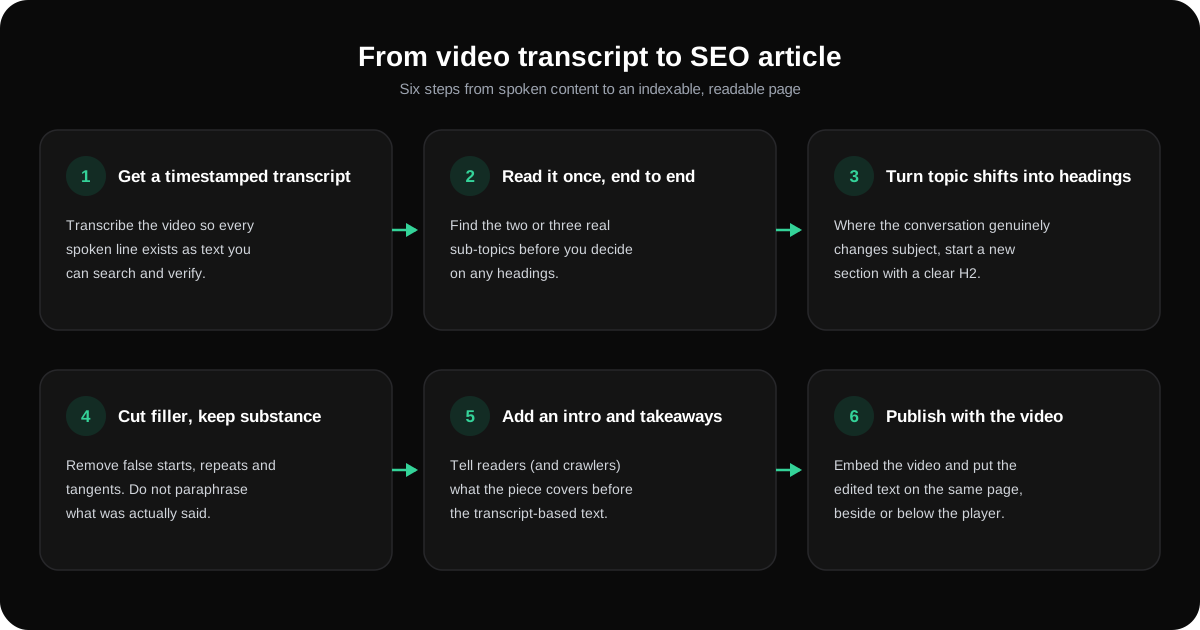
- Start from an accurate, timestamped transcript. Editing decisions later in this process depend on being able to locate and verify what was actually said, at what point in the recording, rather than working from memory or a rough auto-caption pass.
- Read the whole transcript once before editing anything. This is about finding the natural shape of the content, the two or three sub-topics it actually covers, before deciding on section headings. Editing line-by-line on a first pass tends to produce a flat wall of text with no real structure.
- Turn natural topic shifts into headings. A 25-minute conversation rarely stays on one subject the whole way through. Wherever the topic genuinely shifts, that's a heading, not an arbitrary chunk every few hundred words.
- Cut filler, but keep the actual substance. Remove false starts, repeated words, and off-topic tangents. Don't rewrite what was said into different words purely for the sake of it, the value of a transcript-based article is that it reflects what was genuinely said, not a paraphrase.
- Add a short introduction and, where useful, a takeaways section. A reader (and a crawler) benefits from knowing what the piece covers before reading the full transcript-derived text, the same reason most long-form articles open with a summary.
- Embed the video and place the edited transcript beneath or beside it, not instead of it. The video still carries value for viewers who prefer to watch; the text carries the SEO and accessibility value. Neither replaces the other.
Where to Put the Transcript on the Page
There are three common approaches, and they aren't equally effective:
| Approach | What it does | Trade-off |
|---|---|---|
| Full transcript, visible on the page | Every word is crawlable and immediately visible to a reader | Can look unstructured if left completely unedited; works best once lightly cleaned up per the steps above |
| Full transcript inside a collapsed/expandable section | Keeps the page visually shorter while the text is still present in the page's HTML | Confirm the collapsed text is genuinely present in the page source, not loaded only on click, or a crawler may not see it the same way a visible block would be seen |
| Transcript excerpt with a link to the full version | Keeps the page short, sends interested readers elsewhere for the full text | Splits the SEO value across two pages instead of concentrating it on one, generally the weaker option of the three for a page that's specifically trying to rank on the content itself |
For a page whose whole purpose is turning spoken content into indexable text, a visible or expandable full transcript on the same page as the video is the more defensible default; sending the transcript to a separate page only makes sense when that page has its own distinct reason to exist.
Mistakes That Undo the SEO Value
- Publishing the raw, unedited transcript and calling it done. Filler words, false starts, and cross-talk left in place make the page harder to read and don't add anything a cleaned-up version wouldn't also provide, while losing the readability that keeps a visitor on the page.
- Treating the transcript as a place to stuff keywords that weren't actually said. A transcript's value is that it reflects real spoken content. Editing in phrases that were never spoken, to chase a keyword, undermines the honesty of the format and can read as unnatural to both readers and search engines.
- Publishing the transcript with no headings, intro, or formatting at all. A single unbroken block of dialogue is technically crawlable but far less useful to a reader than the same content organized around its natural sub-topics, and a page nobody wants to read rarely holds its ranking even if it briefly earns one.
- Forgetting the video itself still needs its own metadata. A transcript supplements a title, description, and (where the platform supports it) structured video markup, it doesn't replace the need for those basics.
Beyond One Blog Post: Reusing the Same Transcript Elsewhere
A transcript that's already been through the cleanup process above is reusable well past the single article it was built for. The same source material can become social captions built from a strong quote, a newsletter section built around the piece's main point, or an FAQ section built from questions that came up naturally in the conversation, structured with page-level Q&A markup where the platform supports it. None of that requires re-transcribing anything, it's the same accurate text, repackaged for a different surface.
Where YumiLM Fits, and Where It Doesn't
YumiLM doesn't write SEO articles, generate headings for you, or auto-publish a blog post from a video. What it produces is the raw material the workflow above depends on: paste a YouTube link, upload a file, or record live audio, and it returns a timestamped transcript along with an Insight Guide that lays out a premise, key points, and a conclusion, useful for step 2 and step 5 above before the actual editing work starts. Transcripts can be translated into any of YumiLM's 11 supported languages, both the transcript and the Insight Guide export as PDF if the editing happens outside the app, and uploaded files can also be exported as .srt subtitles.
What it doesn't do: turn the transcript into finished prose, choose which sections deserve their own heading, or write keyword-aware copy. Every editing decision above, what to cut, where the headings go, how the introduction reads, stays a human task. One more thing to know if your video has several speakers: the transcript is sequential, timestamped text in the order it was spoken, without automatic speaker labels, so attributing a quote to a specific person is something you confirm by listening alongside the transcript.
To start from a YouTube video, see YouTube video to notes; for a recording on your computer, upload a file.
Frequently Asked Questions About Video Transcripts for SEO
Does adding a transcript guarantee my page will rank higher? No single change guarantees a ranking outcome. What exists is vendor-reported evidence, such as the This American Life case study and the widely repeated 37-page figure, that points to real gains in some cases. It is not a guarantee that applies identically to every page in every context.
Should I publish the full transcript or just an excerpt? A full, lightly edited transcript on the same page as the video generally captures more of the available SEO value than an excerpt that sends readers to a second page, since it keeps the complete text and the video together on one URL.
Do I need to rewrite what was said, or just clean it up? Clean it up. Remove filler, false starts, and repetition, but keep the actual substance of what was said. Rewriting the content into different words to chase a keyword undermines the accuracy that makes a transcript-based article credible in the first place.
Can I turn the same transcript into more than one piece of content? Yes. A cleaned-up transcript is reusable for social captions, newsletter sections, or an FAQ block built from questions that came up naturally, without needing to redo the transcription itself.
Does YumiLM automatically turn my video into a finished SEO article? No. YumiLM produces a timestamped transcript and an Insight Guide (premise, key points, conclusion). Structuring that material into headings, cutting filler, and writing the surrounding copy is still an editing step you do yourself.
Sources
- Video SEO best practices — Google Search Central
- 7 Ways Captions and Video Transcripts Improve Video SEO — 3Play Media
- This American Life case study — 3Play Media