
Podcast Show Notes That Actually Get Read (With Templates)
By the YumiLM Team
The fastest way to write podcast show notes: [Episode Title with Keyword] — [1-2 sentence hook summarizing the episode] — 3 to 5 bullet takeaways — timestamps — guest bio and links — one call to action. That single line is the skeleton every good episode page follows, whether it runs 80 words or 1,200.
Before you write a word, confirm you have:
- The episode's searchable topic and guest name (for the title and slug)
- Three to five concrete takeaways a listener could quote back to a friend
- Timestamps pulled from your transcript
- One clear action you want the reader to take
Keep platform descriptions between 50 and 200 words; save the long-form version, 1,000 words or more, for your website's episode page.
This guide is about turning a transcript you already have into a publishable episode page. If what you actually want is a quick summary of an episode's content rather than a formatted show-notes page, see Summarize Podcasts instead.
Key Takeaways
| Point | Details |
|---|---|
| Use the one-line template | Title, hook, takeaways, timestamps, links, and guest bio cover the minimum for any episode page. |
| Match length to platform | Keep platform descriptions to 50 to 200 words; save long-form, transcript-rich pages for your website. |
| Label timestamps descriptively | Use topic-based labels instead of raw time codes to boost searchability and navigation. |
| Limit CTAs to one or two | Multiple competing calls to action dilute clicks on every single one. |
| Use a transcript-first workflow | YumiLM turns a raw recording into a transcript and an Insight Guide you can pull timestamps and quotes from directly. |
Where to Learn More About Show Notes and Templates
- Buzzsprout's show notes templates for word-count benchmarks and structure examples
- Riverside's full guide for platform-versus-website formatting
- Fame's fill-in-the-blank template for a ready-made episode structure
- Content Allies' SEO breakdown for keyword and heading guidance
Table of Contents
- Why Podcast Show Notes Matter More Than You Think
- What Should Show Notes Include?
- Four Copy-Paste Show Notes Templates
- SEO Basics Every Episode Page Needs
- How to Build a Repeatable Show Notes Workflow
- Turn One Recording Into Finished Show Notes Faster
- Frequently Asked Questions
- Sources
Why Podcast Show Notes Matter More Than You Think
Show notes do three jobs at once: they make the episode easier to navigate, they get it found on Google, and they give sponsors and guests a reason to keep working with you. Listeners scan for the timestamp that answers their question instead of scrubbing through 45 minutes of audio. That alone reduces drop-off on long episodes.
The SEO payoff is separate and arguably bigger. Search engines can't listen to your podcast, but they can crawl structured, keyword-aware show notes, which is often how new listeners discover an episode months after it airs. Well-organized guest bios and links also make guests more likely to share the episode with their own audience, according to Fame's episode template guidance, which turns every interview into free distribution.
- Better listener experience: clear navigation, accessible timestamps
- Better discoverability: indexable text where audio alone leaves nothing to crawl
- Better monetization: sponsors can see exactly where their mention lands, guests get shareable assets
Pro Tip: Pull two or three lines straight from your show notes and turn them into social captions or a newsletter blurb. You've already written the copy; don't write it twice.
What Should Show Notes Include?
Every strong episode page shares the same core ingredients. Here's how to write each one without overthinking it.
SEO-optimized title. Put your primary keyword and your guest's name in the title if you have one: "How to Price Freelance Work with [Guest Name]" beats "Episode 47" every time. Keep the URL slug short and matching, something like /pricing-freelance-work-guest-name, so the address itself signals the topic.
Hook or summary. Open with one or two sentences that summarize the stakes, not the guest's résumé. On the podcast platform, this needs to work in 50 to 200 words. On your website, you can stretch it into a fuller narrative summary before the bullets.
Key takeaways. Pick three to five points a listener could repeat without hearing the episode. Frame at least one as a quotable line. Short, punchy, shareable statements pulled straight from the conversation tend to get reused on social media more than a generic recap sentence.
Timestamps. Label segments by topic, not just by minute mark. "12:45" tells a reader nothing; "12:45 — Why most freelancers underprice their first project" tells them exactly whether to click. Descriptive labels are searchable in a way raw time codes never are, which is why Content Allies recommends treating each timestamp like a mini headline.
Guest bio. Two or three sentences, plus links to their website, social profiles, or book. This is a professional courtesy as much as an SEO move; it's also, per Fame's guidance, one of the biggest levers for getting a guest to promote the episode themselves.
Links and resources. Include anything mentioned by name during the episode, tools, books, other episodes, and prioritize the ones most relevant to your core topic over an exhaustive list.
Transcript and attachments. For long-form or educational episodes, a full transcript on the website page helps both accessibility and search indexing. For shorter or casual episodes, a link to the transcript is usually enough.
One call to action. Just one, maybe two. A subscribe link, a newsletter signup, a sponsor code. Stacking five CTAs into one episode page dilutes every single one of them, and Buzzsprout's research points to focused CTAs as the better path to actual clicks.
The best show notes read like a trusted friend telling you exactly what's in the episode and exactly where to find the part you care about, nothing padded, nothing buried.
Dos and don'ts: Do keep platform copy under 200 words. Don't cram in every keyword variation you can think of. Do link generously to genuinely relevant resources. Don't turn the page into a link farm; five to eight well-chosen links beats twenty scattered ones.
Four Copy-Paste Show Notes Templates
Different episodes call for different formats. Pick the one that matches where the notes will live.
1. Essentials (50 to 150 words), for platform descriptions:
[Episode Title]. In this episode, [guest name] shares [core insight]. You'll learn [takeaway 1], [takeaway 2], and [takeaway 3]. Listen now and subscribe for more episodes on [topic].
2. Expanded episode page (200 to 400 words): Open with a two to three sentence narrative summary, follow with a "What You'll Learn" bullet list, then full timestamps, guest bio, and a resources section. This is your website's workhorse format.
3. Monetization-first: Lead with the summary and takeaways, then a clearly labeled "Sponsors & Resources" block with codes and affiliate links kept separate from editorial content so they don't clutter the read.
4. Educational long-form (transcript included): Structure it like a blog post, intro, H2 subheadings for major segments, embedded transcript or transcript link, and a resources section at the bottom. This format does the heaviest SEO lifting.
- Match the template to the platform: short for Apple Podcasts and Spotify descriptions, expanded or long-form for your website.
- Fill placeholders with specifics, not generic phrases; a real quote beats "guest shares insights" every time.
- Publish the short version everywhere your podcast is listed, and let the website page carry the full detail.
SEO Basics Every Episode Page Needs
Treat your episode page like any other piece of content competing for search traffic. Put your primary keyword in the title, the first H2, and naturally in the summary, not stuffed into every sentence. Keep the URL slug short and descriptive. Write a meta description under 160 characters that states the episode's core value.
Use headings to break up longer pages; H2s for major sections like "Key Takeaways" and "Timestamps" help both readers and search engines understand the episode's structure. Include ALT text on any guest photos or graphics, and make timestamps clickable where your platform allows it.
Pro Tip: Before you hit publish, run this five-point check: keyword in the title, keyword in the first H2, descriptive timestamps, at least one internal link, one clear CTA.
How to Build a Repeatable Show Notes Workflow
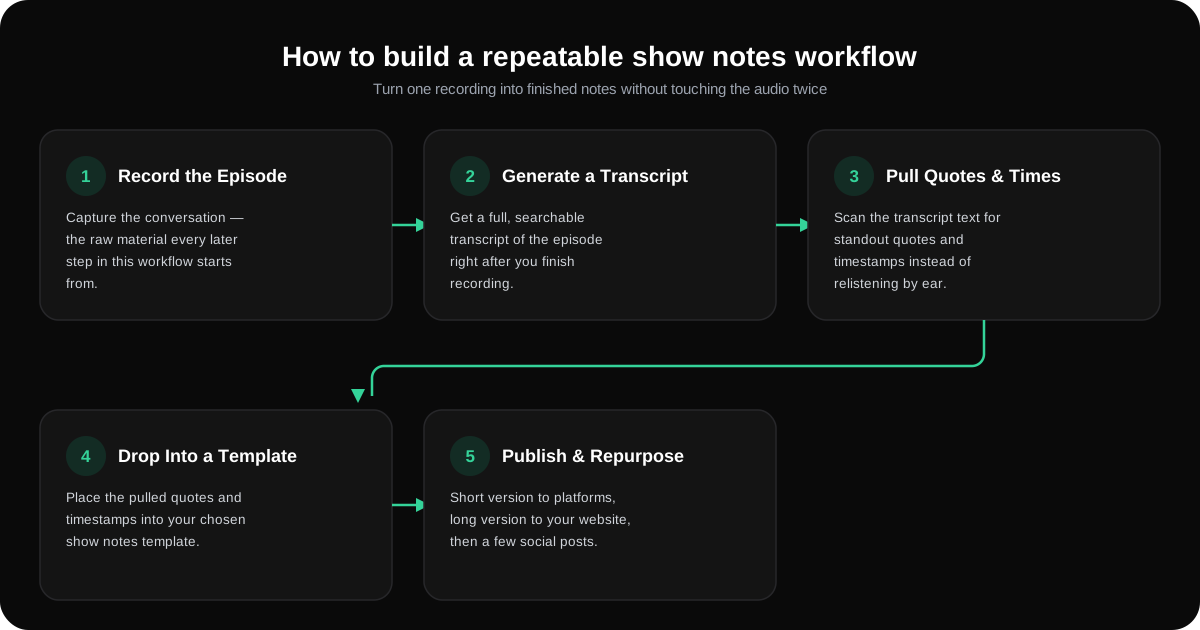
A repeatable workflow turns one recording into finished notes without touching the audio twice.
- Record the episode.
- Generate a full transcript immediately after.
- Pull timestamps and standout quotes straight from the transcript text.
- Drop those into your chosen template.
- Publish the short version to platforms, the long version to your website, then schedule two or three social posts from the same material.
A clean transcript turns steps two and three from a slog into a search. Instead of relistening to find the moment your guest said something quotable, you scan the text. YumiLM's Insight Guide breaks the same recording into timestamped sections and highlighted moments, which is useful raw material when you're drafting notes for a 90-minute conversation and don't want to hunt for the good parts by ear.
Pro Tip: Write the website copy first since it's your long-form SEO asset, then trim it down for the platform description instead of writing both from scratch.
A Producer's Take on Treating Notes as Real Assets
Show notes compound. An episode page indexed today can pull in listeners a year from now, long after the release-week bump fades. Write for the listener first, structure for search second, and measure success in click-throughs, replays, and whether guests actually share the page.
Turn One Recording Into Finished Show Notes Faster
Writing good show notes takes real editorial work, but transcription shouldn't be the bottleneck. YumiLM converts your raw recording into a clean transcript and a structured Insight Guide that surfaces key moments and quotable lines by timestamp, the exact raw material every template above needs.
Say you just finished a 70-minute interview. Instead of relistening for timestamps, you upload the file, get a searchable transcript back with the conversation's key moments already flagged in the Insight Guide, and pull the highlights straight into your expanded episode-page template. Try the upload-and-transcribe workflow on your next episode, or start with the transcription guide to see the full Insight Guide output before you commit.
Frequently Asked Questions
How long should podcast show notes be? Short-form notes for podcast platforms run 50 to 200 words. Long-form website episode pages can run 1,000 words or more, especially when they include a transcript or full resource list.
Where should show notes appear? Publish a short version wherever your podcast is listed, Apple Podcasts, Spotify, and similar apps, and a longer, more detailed version on your own website episode page, which doubles as your primary SEO asset.
What's the biggest mistake creators make writing show notes? Cramming in too many links and calls to action. One focused CTA converts better than five competing ones, and a tight resource list reads better than a link dump.
Do I need a full transcript in my show notes? Not always. Educational or long-form episodes benefit from a full transcript for accessibility and indexing. Shorter or casual episodes can link out to the transcript instead of embedding it.
Can I reuse show notes content elsewhere? Yes. Key takeaways and quotable lines from your show notes translate directly into social captions, newsletter blurbs, and even blog posts, so you're writing the copy once and reusing it several times over.
Sources
- How to Write Podcast Show Notes 5 Best Templates 2026
- Podcast Show Notes: Full Guide with Templates & Examples
- Podcast Show Notes Template (Free) | Fame
- How to write podcast show notes