
Free vs. Paid Transcription Tools: When Free Is Enough, and When It Isn't
By the YumiLM Team
Every transcription tool markets a free tier, and most of them are genuinely free, not a bait-and-switch. The real question isn't whether a free option exists. It's whether its actual limits — how long a single recording can run, whether you can export what you get, and how the accuracy holds up once the audio isn't studio-clean — match what you actually need this week.
This guide walks through what "free" typically means across transcription tools, the specific limits that tend to force an upgrade, and how to tell early whether you'll outgrow a free plan before you've invested real time in one. It's about the free-vs-paid decision itself, not a price-by-price market breakdown — for the full $-per-minute and subscription pricing picture across the market, see What Transcription Really Costs in 2026.
Key Takeaways
| Point | Details |
|---|---|
| Free tiers cap recordings, not just monthly minutes | A generous-looking monthly allowance is often gated by a much smaller per-session or per-file limit. |
| Export is the real dividing line | Several free tiers let you transcribe but block downloading or copying the result — a transcript you can't take with you isn't usable for most real work. |
| Accuracy holds up on clean audio, drops on real audio | Free and paid engines often perform similarly on a quiet, single-speaker recording; the gap widens with background noise, crosstalk, or multiple speakers. |
| Fully free, no-limit options exist but cost setup time | Open-source tools like OpenAI's Whisper are free with no usage cap, but require command-line setup and reasonably capable hardware — a real cost, just not a monetary one. |
| The upgrade trigger is usually recurring use, not one file | A single one-off recording rarely justifies paying; needing to transcribe regularly, export results, or get more than a bare transcript is what actually makes a paid plan worth it. |
Table of Contents
- What "free" actually means across transcription tools
- The limits that actually force an upgrade
- How accuracy really compares
- When a free tool is genuinely enough
- Signs you've outgrown the free tier
- Where YumiLM's free plan fits
- Frequently Asked Questions
- Sources
What "free" actually means across transcription tools
"Free transcription" covers a few genuinely different things, and mixing them up is the most common source of disappointment:
- A limited free tier of a paid product. Most mainstream transcription apps offer a free plan specifically to let you try the product, with real caps built in. Otter.ai's free plan includes 300 minutes a month, but caps any single conversation at 30 minutes regardless of how much of the monthly allowance remains. Notta's free tier advertises 120 minutes a month, but caps each individual recording at roughly 3 minutes and blocks exporting the transcript on that tier.
- A capped daily tool. Some tools skip the monthly-minutes framing and cap by session instead — TurboScribe's free tier, for example, allows a small number of files per day (commonly cited around 3 files, up to 30 minutes each).
- A genuinely free, open-source engine. OpenAI's Whisper is free with no usage cap and no account required, but it isn't a hosted app — running it means installing it yourself (command-line setup) on hardware capable of handling the model, which is a real barrier for anyone who isn't comfortable with that kind of setup.
- Built-in captions in tools you already use. YouTube's auto-captions and similar built-in transcription in video platforms and some word processors produce a rough transcript for free, but with no structure, no export polish, and accuracy that tracks whatever the platform's underlying model happens to deliver that day.
None of these are wrong, exactly — they're different tools solving different problems, and "free transcription tool" as a search term covers all four.
The limits that actually force an upgrade
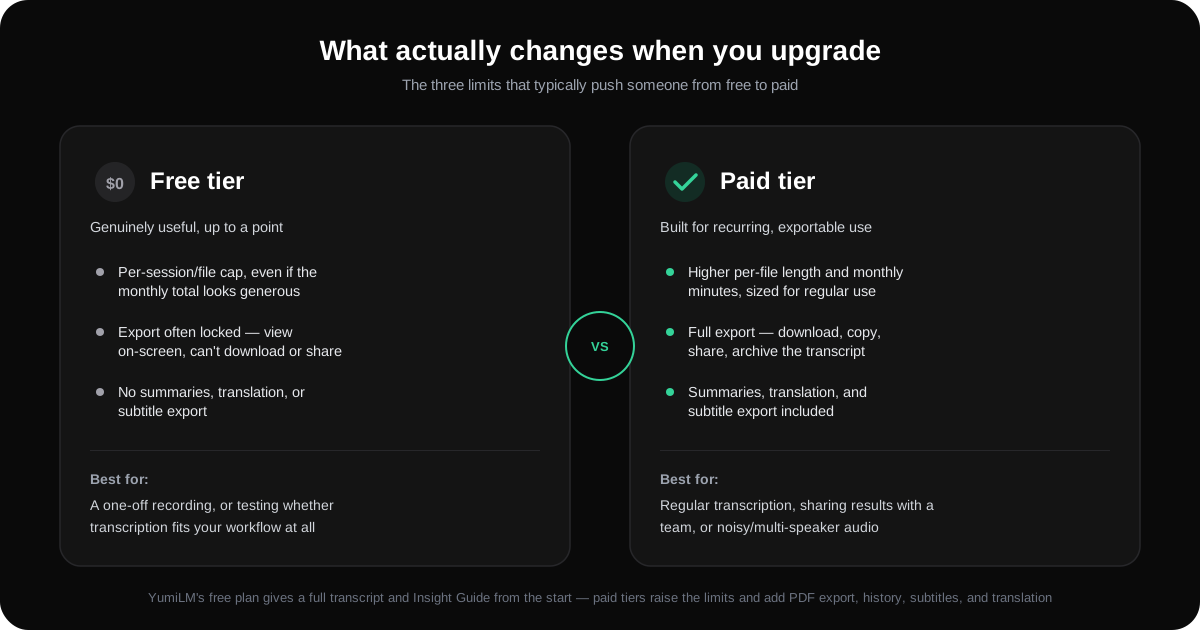
In practice, three limits do most of the work of pushing someone from free to paid:
- Per-session or per-file caps, not just the monthly total. A 300-minute monthly allowance sounds generous until a single 45-minute interview blows past a 30-minute per-conversation cap and gets cut off mid-recording. If what you transcribe tends to run long — lectures, interviews, meetings — the per-session cap matters more than the headline monthly number.
- Export locks. A transcript you can view on-screen but can't download, copy, or share isn't a working transcript for most real use cases — sharing with a team, pasting into a document, or archiving for later. Several free tiers transcribe successfully and then gate the output itself behind a paywall, which is a materially different limitation than a minutes cap.
- Missing extras that turn a transcript into something usable. A raw transcript is a starting point, not a deliverable, for a lot of workflows. Summaries, translations, subtitle exports, and structured notes are commonly reserved for paid tiers, even when the base transcription itself is free.
How accuracy really compares
Accuracy is the limit people worry about most and, in practice, the one that depends most on the audio itself rather than the price tag. On clean, single-speaker audio with minimal background noise, free and paid transcription engines frequently land in a similar range, often above 90% word accuracy, because that's the easiest case for any modern speech-recognition model. The gap widens on harder audio: background noise, overlapping speakers, heavy accents, or technical vocabulary pull accuracy down across the board, and it's common for free-tier accuracy to fall noticeably further than a tool's own clean-audio marketing numbers would suggest, since a lower-resource model or older engine is more often what powers a free tier.
The practical takeaway: don't judge accuracy from a vendor's best-case demo number. Test with your own actual audio, not a quiet sample recording, before deciding a free tier's accuracy is or isn't good enough for your use case.
When a free tool is genuinely enough
Free is a reasonable, often correct choice when:
- You need one recording transcribed once, not a repeatable workflow.
- The recording is short enough to fit comfortably inside the tool's per-session cap.
- You only need to read the result on-screen, not export, share, or archive it.
- The audio is clean: one speaker, quiet room, no crosstalk.
- You're testing whether transcription fits your workflow at all, before committing to anything.
If all five of those hold, paying for a transcription tool this week probably isn't worth it.
Signs you've outgrown the free tier
The upgrade decision usually isn't about any single limit — it's a pattern. Watch for:
- You're hitting the per-session or monthly cap regularly, not as a one-off.
- You need to export, share, or archive transcripts, and the free tier blocks that.
- Your audio regularly includes background noise, multiple speakers, or accents the free tier struggles with.
- You keep manually summarizing or reformatting the raw transcript yourself — a sign you actually need the summary/notes feature a paid tier bundles in.
- Transcription has become a recurring part of your routine (weekly interviews, every lecture, every meeting) rather than an occasional task.
Two or more of these showing up consistently is a reasonable signal to stop working around a free tier's limits and pay for a plan that doesn't have them.
Where YumiLM's free plan fits
YumiLM's own free plan follows the same shape described above, not a different set of rules: 1 hour of transcription per month, files up to 20 minutes each, YouTube link and file upload support, three AI Insight Guides, and no credit card required to start. It's built to answer the same question this guide is about — whether transcription fits your workflow at all — before asking anyone to pay.
Where it differs from a "read-only" free tier is that the transcript and Insight Guide you get on the free plan are the same core output as the paid tiers, not a stripped-down preview: a full timestamped transcript plus a structured summary, from the first use. Paid plans (Basic at €9.99/month and up) raise the monthly hour allowance, the per-file length cap, and add PDF export, full history, subtitles, and translation into 11 languages, in that order as you move up tiers — the same "recurring use, export, and extras" triggers described above, not a different logic than the rest of this market.
Try the free plan with a real recording from your own workflow, not a demo file, to see honestly whether the free tier's limits matter for what you actually do.
Frequently Asked Questions
Is free transcription accurate enough for real work? On clean, single-speaker audio, often yes. Accuracy drops on noisy or multi-speaker recordings regardless of whether the tool is free or paid, so test with your own actual audio rather than trusting a vendor's clean-demo accuracy number.
What's the biggest limitation of free transcription tools? Usually not the monthly minute allowance itself, but a smaller per-session cap, an export lock on the finished transcript, or the absence of extras (summaries, translation, subtitles) that turn a raw transcript into something usable.
Is Whisper really free with no limits? Yes for the software itself — OpenAI's Whisper is open-source with no usage cap — but running it requires installing it yourself and hardware capable of handling the model, which is a real setup cost even though there's no subscription fee.
When does it make sense to pay for transcription? When you're transcribing regularly rather than once, when you need to export or share the result, when your audio is noisy or multi-speaker enough that a free tier's accuracy isn't reliable, or when you need more than a raw transcript (summaries, subtitles, translation).
Sources
- Otter.ai Pricing
- Best free transcription tools in 2026: 7 compared on limits, exports, and languages
- Top 10 Free Transcription Tools in 2026 (Honest Comparison)
- Free vs Paid Transcription: Is It Worth Paying? (2026 Guide)