How to Make Cornell Notes From a Lecture Video
By the YumiLM Team
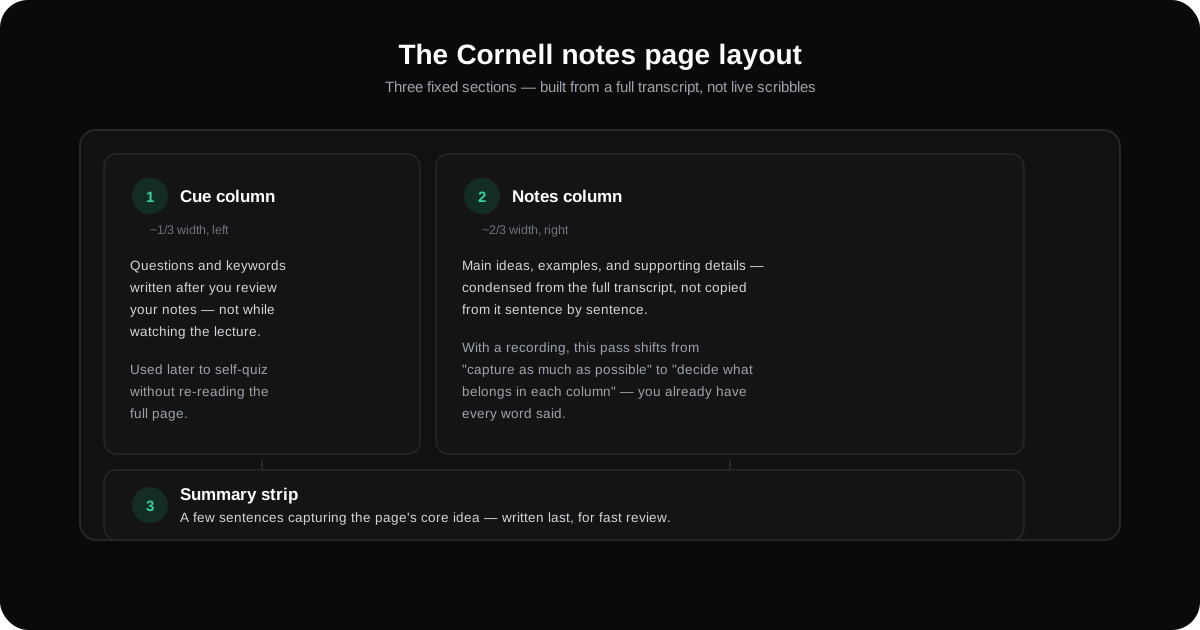
The Cornell method splits a page into three parts: a wide right-hand column for notes taken during the lecture, a narrower left-hand cue column for questions and keywords added afterward, and a summary strip across the bottom. Applied to a recorded lecture instead of a live one, the same three-part structure still works, you just get an accurate transcript to draw from instead of whatever you managed to scribble in real time.
That distinction matters more than it sounds. Cornell notes were designed around live note-taking, where the two-pass structure (in-class notes, then post-class review) compensates for what you inevitably miss. A recording removes that constraint entirely. You already have every word said, so the real work shifts from "capture as much as possible" to "decide what belongs in each column."
Key Takeaways
| Point | Details |
|---|---|
| Three fixed sections | Notes column (right, ~2/3 width), cue column (left, ~1/3 width), summary strip (bottom of the page). |
| Origin | Devised by Walter Pauk, an education professor at Cornell University, in the 1950s, and popularized in his book How to Study in College. |
| Video changes the workflow, not the structure | With a recording, you start from a full transcript instead of live scribbles, so notes-column work becomes selection, not capture. |
| Cue column comes from review, not the lecture itself | Questions and keywords in the left column are written after you've already read your notes, not while transcribing. |
| YumiLM supplies the transcript and a first-pass structure | It doesn't generate a formatted Cornell template, but its transcript and Insight Guide give you the accurate source text and an initial key-points breakdown to build the columns from. |
Table of Contents
- What the Cornell Method Actually Is
- Why Recorded Lectures Change the Process
- Building Cornell Notes From a Lecture Recording, Step by Step
- What Goes in Each Column
- Common Mistakes When Adapting Cornell Notes to Video
- Where YumiLM Fits, and Where It Doesn't
- Frequently Asked Questions About Cornell Notes From Video
- Sources
What the Cornell Method Actually Is
The Cornell method is a fixed page layout, not a note-taking style you interpret loosely. Cornell University's own Learning Strategies Center describes three sections on a single page: a wide column on the right for notes taken during the lecture, a narrower column on the left (roughly 2.5 inches) reserved for cues, and a summary section spanning the bottom of the page.
The two-column split isn't arbitrary. The right side is where content lands first, main ideas, examples, and supporting details written in your own abbreviated shorthand while the lecture is happening. The left side stays empty during the lecture itself and gets filled in afterward, when you review your notes and add the questions or keywords that will later let you quiz yourself without re-reading everything. The bottom summary forces a final compression step: a few sentences that capture the page's core idea, useful when you're skimming weeks of notes before an exam instead of one lecture's worth.
Multiple independent sources confirm the same origin: Walter Pauk, an education professor at Cornell University, devised the system in the 1950s and popularized it through his book How to Study in College. The format has stayed essentially unchanged since, which is part of why it shows up in study-skills guidance from university learning centers rather than fading like most decades-old study techniques.
Why Recorded Lectures Change the Process
Cornell notes were built for a specific constraint: you hear something once, in real time, and you have to decide instantly what's worth writing down. That constraint drives the whole two-pass design, quick capture during class, careful review after.
A recorded lecture removes that constraint. You're not racing to keep up with a professor talking faster than you can write, because the words aren't going anywhere. That changes what the "notes" pass is actually for. Instead of capturing as much as you can before it disappears, you're deciding what's worth keeping from something you can already see in full, a much easier problem, but a different one.
This is also where most guidance written for live lectures stops being directly useful. A transcript gives you the raw material for the right-hand column, but Cornell notes were never meant to be a copy of the transcript itself. Copying full sentences into the notes column defeats the format's purpose: condensation, not transcription. The transcript is the source you work from, not the notes you end up with.
Building Cornell Notes From a Lecture Recording, Step by Step
- Get an accurate transcript of the full recording. You need a reliable text version of the lecture before you can build anything from it, whether that's from a transcription tool, a recording device with built-in transcription, or a manual pass.
- Skim the transcript once before writing anything. This pass is about spotting the lecture's overall shape, its major sections, its main claims, before you start condensing. Writing notes directly from raw video, section by section, without seeing the whole arc first tends to produce lopsided notes that over-cover the beginning and rush the end.
- Fill the notes column with condensed content, not copied sentences. Pull out main ideas, key terms, examples, and any formulas or definitions stated explicitly, in your own abbreviated phrasing. This is the step where a good transcript earns its keep: you can check exact wording on anything ambiguous instead of guessing.
- Leave the cue column empty until this step is done. Filling it in prematurely tends to produce generic questions before you actually know what the lecture covered.
- Review your notes column and write cues. Go back through what you just wrote and add questions or keywords in the left column, one per major point in the notes column, phrased so a blank cue column would prompt you to reconstruct the note beside it. This is the self-testing mechanism the whole format is built around.
- Write the bottom summary last. Two to four sentences that capture the page's core idea, written only after the rest of the page is finished, since you can't accurately summarize something you haven't fully organized yet.
- Use the cue column to self-test before moving on. Cover the notes column, read each cue, and try to reconstruct the note from memory. This is the step that actually builds retention, the page layout by itself is just organization.
What Goes in Each Column
| Column | What belongs there | What doesn't |
|---|---|---|
| Notes (right, wide) | Condensed main ideas, key terms, definitions, examples, formulas stated in the lecture | Full sentences copied verbatim from the transcript |
| Cues (left, narrow) | Questions or keywords written after review, one per major note | Anything written during the first pass through the material |
| Summary (bottom) | A short synthesis of the whole page's content | A list of everything covered, restated |
Illustrative example
Transcript excerpt
"Cellular respiration converts glucose and oxygen into ATP, carbon dioxide, and water. This happens in three main stages: glycolysis in the cytoplasm, the Krebs cycle in the mitochondrial matrix, and the electron transport chain across the inner mitochondrial membrane."
Cues (left, narrow)
What are the 3 stages of cellular respiration, and where does each occur?
Notes (right, wide)
Cellular respiration: glucose + O₂ → ATP + CO₂ + H₂O. 3 stages: (1) glycolysis — cytoplasm, (2) Krebs cycle — mitochondrial matrix, (3) electron transport chain — inner mitochondrial membrane.
Summary (bottom, full width)
Cellular respiration breaks down glucose into usable energy (ATP) across three sequential stages, each in a different part of the cell.
Illustrative example — not pulled from an actual recorded lecture.
Common Mistakes When Adapting Cornell Notes to Video
- Transcribing instead of condensing. Having a full transcript makes it tempting to lift whole sentences into the notes column. That produces a longer, less useful page, not a better one, since the format's value comes from the compression itself.
- Writing cues during the first pass. Cues are supposed to come from reviewing already-organized notes, not from watching the lecture. Cues written too early tend to just restate the video's structure instead of testing recall.
- Skipping the summary because the page feels "done." The summary is the step most often dropped under time pressure, and it's also the step that makes a page usable for quick review weeks later instead of requiring a full re-read.
- Treating every section of the lecture as equally note-worthy. Skimming the transcript first (step 2 above) exists specifically to avoid this, so you can allocate more of the notes column to the sections that actually carried the lecture's argument.
Where YumiLM Fits, and Where It Doesn't
YumiLM doesn't generate a formatted Cornell-style page, there's no template output with pre-drawn columns. What it does provide is the two inputs the method depends on: an accurate, timestamped transcript of the recording, and an Insight Guide that organizes the lecture into a premise, key points, and a conclusion before you've written a single note.
That combination maps reasonably well onto the workflow above. The transcript is what you check against when condensing the notes column, so you're not guessing at a formula or a term you half-remember. The Insight Guide's key points give you a first-pass sense of what the lecture actually covered, useful for the initial skim in step 2, before you start filling in your own columns by hand. Paste a YouTube link or upload a recording on the YouTube video to notes page to see the transcript and Insight Guide format directly. If you're sitting in the lecture and don't have a recording yet, recording it live in your browser works the same way — no separate recorder or file to manage afterward.
What it doesn't do: build flashcards, generate spaced-repetition schedules, or run an AI tutor that quizzes you on the material. If a note-taking app promising an auto-generated Cornell template or built-in flashcards is what you're after, that's a different category of tool than a transcription and Insight Guide product, and worth knowing going in rather than after signing up.
Frequently Asked Questions About Cornell Notes From Video
Can I use Cornell notes with a recorded lecture instead of a live one? Yes. The page structure, notes column, cue column, summary, doesn't depend on the lecture being live. What changes is the workflow: with a recording, you can skim the whole transcript before deciding what belongs in the notes column, instead of writing in real time as the live-lecture version of the method assumes.
Do I need special software to make Cornell notes? No. The original method is a paper page layout. Any note-taking app, document template, or even a hand-drawn page works, as long as it keeps the three sections separate. What a recording adds is an accurate transcript to check details against, not a requirement for particular software.
What's the difference between the notes column and just copying the transcript? Condensation. The notes column is meant to hold your own abbreviated version of the main ideas, terms, and examples, not full sentences lifted from the source. Copying the transcript directly produces a longer page that skips the compression step the method is built around.
When should I write the cue column? After the notes column is finished, not during the lecture or the first transcript pass. Cues are questions or keywords meant to test whether you can reconstruct a note from memory, which only works if they're written from a position of already knowing what the note says.
Does YumiLM create Cornell-formatted notes automatically? No. YumiLM produces a full transcript and an Insight Guide (premise, key points, conclusion), which supply the source material and an initial structure to work from. Formatting that into the three-column Cornell layout, and deciding what belongs in the notes and cue columns, is still a manual step.
Sources
- The Cornell Note Taking System — Cornell University Learning Strategies Center
- Cornell Notes — Wikipedia
- Mastering Note-Taking with the Cornell System — Education Corner
- The Cornell Method for Note-Taking — University of Cincinnati Learning Commons