
What Is Intelligent Verbatim Transcription, and When Should You Use It?
By the YumiLM Team
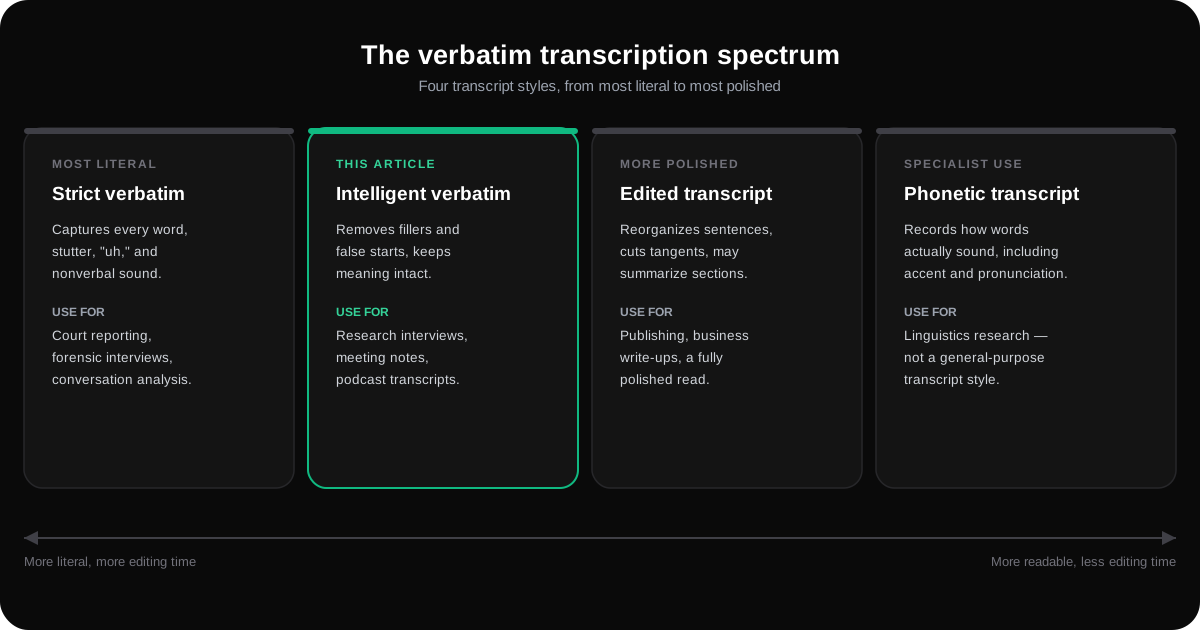
Intelligent verbatim transcription is a cleaned-up transcript that keeps the speaker's meaning intact while stripping out filler words, false starts, and nonverbal noise like coughs or throat-clearing. The verdict: use it whenever readability matters more than capturing every "um" and stutter, which covers most research interviews, meeting notes, and podcast transcripts.
Before you commit, check two things:
- Do you need forensic-level detail on how something was said (courtroom testimony, discourse analysis)? If yes, strict verbatim is the safer call.
- Will this transcript get published or quoted directly? If so, decide upfront how much you'll clean speaker quotes so you don't have to redo the work later.
TL;DR:
- Intelligent verbatim is ideal for most research interviews, meetings, and podcasts because it improves readability by removing fillers and false starts.
- For legal or forensic work requiring precise speech details, strict verbatim remains necessary to capture every nuance and sound.
- Preparing high-quality audio and identifying speakers in advance significantly reduces editing time and transcription errors.
- Modern AI transcription tools support automatic punctuation, speaker diarization, and timestamps to enhance intelligent verbatim accuracy.
- Using an integrated platform that combines transcription and organization features, like YumiLM, streamlines turning transcripts into organized study notes or research summaries.
Table of Contents
- Where Intelligent Verbatim Fits Among Transcription Styles
- How Intelligent Verbatim Output Actually Looks Different
- Before-and-After Examples Across Three Common Use Cases
- When to Choose Intelligent Verbatim (and When Not To)
- Getting Better Raw Material Before You Transcribe
- How AI Transcription Tools Handle the Cleanup Work
- Turning a Clean Transcript Into Something You Can Actually Use
- Key Takeaways
- Frequently Asked Questions
- Sources
Where Intelligent Verbatim Fits Among Transcription Styles
Transcription isn't one thing. There are four recognized types, and each solves a different problem.
- Strict (true) verbatim captures every word, stutter, "uh," and nonverbal sound. It's the standard for court reporting, forensic interviews, and any research where the manner of speech is the data itself, not just the content.
- Edited (clean) transcript goes further than intelligent verbatim, sometimes reorganizing sentences, cutting tangents, or summarizing sections entirely. It prioritizes a polished read over a complete record.
- Intelligent verbatim sits in the middle. It removes filler words, false starts, and repeated phrases, and may correct grammar, but it never alters the substance of what someone said, according to Appen's breakdown of verbatim styles.
- Phonetic transcription records how words actually sound, including accent and pronunciation. It's a linguistics tool, not a general-purpose one.
Each style maps to a context: legal and forensic work leans strict, publishing and business leans intelligent or edited, and linguistics research leans phonetic.
How Intelligent Verbatim Output Actually Looks Different
The editorial rule is simple: keep the meaning, drop the noise. Intelligent verbatim removes "um," "you know," repeated words, and false starts, while it can also restructure a run-on sentence into something a reader can actually follow, according to the Transcription Certification Institute. What it does not do is change what someone meant or invent words they didn't say.
Here's the same moment from an interview, transcribed two ways.
Strict verbatim: "So, um, I think, I think what happened was, was that the, the funding just kind of, you know, dried up around, uh, 2019."
Intelligent verbatim: "I think what happened was that the funding dried up around 2019."
A second pair, from a meeting recording:
Strict verbatim: "Yeah so we, we need to, we need to circle back on the, the budget thing before, before Friday."
Intelligent verbatim: "We need to circle back on the budget before Friday."
Notice what survives: the facts, the timeline, the decision. What disappears: the hesitation and repetition that add zero analytical value for most readers. The trade-off is real, though. If you're studying how someone hedges under pressure, that stripped-out "um" was your data.
Before-and-After Examples Across Three Common Use Cases
Seeing the transformation side by side makes the decision easier than any definition can. These are illustrative examples, not transcripts of real recordings.
- Academic interview. Raw audio: "So the, the participants, they were kind of, um, hesitant at first to, to talk about their experience." Intelligent verbatim: "The participants were hesitant at first to talk about their experience." A researcher coding themes needs the second version to move fast; only a conversation-analysis project needs the first.
- Staff meeting. Raw audio: "Okay so, so the deadline, the deadline is, is moved to next, next Thursday I think, yeah Thursday." Intelligent verbatim: "The deadline is moved to next Thursday." Meeting minutes exist to record decisions, not hesitation.
- Podcast snippet. Raw audio: "I mean, honestly, honestly I think, I think the whole industry is, is kind of missing the point here." Intelligent verbatim: "Honestly, I think the whole industry is missing the point here." For a pull quote in an article, you'd keep "Honestly" for tone but drop the stutter, since publishing usually wants the personality without the noise.
When to Choose Intelligent Verbatim (and When Not To)
One-line rule: if a reader would judge the transcript on clarity, go intelligent verbatim; if a reader would judge it on precision of delivery, go strict.
Run through this checklist before you pick a style:
- Are you analyzing what was said or how it was said?
- Will this transcript be quoted in a publication or shared externally?
- Does the project have a legal, compliance, or forensic requirement?
- What does your audience expect: a polished document or a faithful record?
- How much time and budget do you have for editing?
Qualitative research interviews, market research write-ups, business meetings, and podcast transcripts commonly use intelligent verbatim, as researchers and content teams tend to prioritize clarity over exact conversational texture — though the right choice always depends on your specific method and what your institution or publication requires. Courtroom testimony, forensic interviews, and conversation-analysis studies typically require strict verbatim instead.
Getting Better Raw Material Before You Transcribe
Good intelligent verbatim starts before you hit record, not after.
- Fix your audio first. A decent USB microphone in a quiet room beats a laptop mic in a coffee shop every time. Run a 30-second test recording and actually listen to it before your real session starts.
- Set up speaker identification. Ask each speaker to say their name at the start of the recording. This short pre-roll dramatically improves automated speaker diarization, the process of tagging who said what.
- Note names and jargon as you go. Keep a short list of proper names, technical terms, and acronyms from the session so you can proofread the transcript against it afterward, rather than guessing at spellings from memory.
- Review the output critically. Check spelled names, verify timestamps against key moments, and flag any ambiguous phrasing the software guessed at.
Pro Tip: If a hesitation or repeated phrase actually signals something meaningful, like a speaker correcting themselves mid-thought, manually restore it during editing. Intelligent verbatim tools clean aggressively by default, but you can always add nuance back in.
How AI Transcription Tools Handle the Cleanup Work
Modern cloud speech-to-text engines already do much of this heavy lifting. Services like Amazon Transcribe offer automatic punctuation, speaker diarization, and timestamping, features that directly improve intelligent verbatim quality.
YumiLM builds on that foundation with a workflow suited to research and content work specifically:
- Automated transcription with timestamps built into every transcript
- An editable transcript, so you can correct names, jargon, or misheard words yourself before relying on it
- An Insight Guide layer that organizes key ideas, examples, and a final synthesis from the transcript, useful for study notes or a video analysis without rewatching hours of footage
Stitching together a transcription tool, a separate editor, and a note-taking app costs you time you don't get back. An integrated workflow keeps everything in one place.
A note on common mistakes
The two mistakes that cost the most editing time later: recording in a noisy room, and not jotting down unusual names or technical terms while they're fresh in your memory. Both are avoidable with a minute of prep before you hit record.
Turning a Clean Transcript Into Something You Can Actually Use
Getting an intelligent verbatim transcript is only half the job. Researchers and students usually need to turn that transcript into notes, a summary, or a citable document, and that's the part most transcription tools leave you to do manually.
YumiLM handles the full path: paste a YouTube URL, upload an audio or video file, or capture a live session, and it generates a cleaned transcript, subtitles, translations, and a structured Insight Guide in one pass. The Insight Guide organizes the transcript's key ideas, examples, and important moments into a document you can use as study notes, a research summary, or a narrative guide, without you manually re-reading the whole thing. For interview-heavy research, that means less time formatting and more time analyzing.
Start with a single file or YouTube link to see how the transcription and Insight Guide workflow handles your own material, or upload a recording directly to generate your first cleaned transcript.
Key Takeaways
| Point | Details |
|---|---|
| Four transcription types exist | Strict verbatim, edited/clean, intelligent verbatim, and phonetic each fit different use cases. |
| Intelligent verbatim keeps meaning | It drops fillers, false starts, and repeated words but never changes what was said. |
| Match style to your goal | Choose strict verbatim for legal or forensic needs; intelligent verbatim for readability. |
| Prep work reduces errors | Good audio, speaker pre-rolls, and a short list of names/jargon cut editing time significantly. |
| YumiLM adds structure beyond text | Its Insight Guide organizes a cleaned transcript into study notes or a research summary. |
Frequently Asked Questions
What is verbatim transcription? Verbatim transcription is any transcript that keeps a speaker's actual words rather than summarizing them. It's not one fixed style: strict verbatim keeps every "um" and false start, intelligent verbatim keeps the wording but drops the noise, and each sits at a different point on the spectrum described above.
What's the difference between strict verbatim and intelligent verbatim transcription? Strict verbatim captures every stutter, filler word, and nonverbal sound, exactly as spoken, which is why it's the standard for court reporting and forensic interviews. Intelligent verbatim keeps the same underlying wording and meaning but removes fillers, false starts, and repeated phrases so the transcript reads cleanly, which is what most research interviews, meeting notes, and podcast transcripts actually need.
Is "clean verbatim transcription" the same thing as intelligent verbatim? Yes, "clean verbatim" is a common alternate name for intelligent verbatim, both describe a transcript that trims filler and repetition while leaving the speaker's actual words and meaning untouched. That's different from an edited (or "clean read") transcript, which goes further and can reorganize sentences or cut tangents entirely.
How do you get a verbatim interview transcript? Start with a clean audio recording, then run it through an AI transcription tool for a fast first draft, and finish with a short manual pass to fix names, jargon, and any misheard words. YumiLM handles the transcription step directly: paste a YouTube link, upload a file, or capture a live session, and it returns a timestamped, editable transcript alongside subtitles, translations, and a structured Insight Guide, so you're not stitching together separate tools for each output.
Can AI transcription tools produce a verbatim transcript? Yes, modern AI transcription tools like YumiLM produce a full, timestamped, editable transcript of the recording as the starting point; whether it ends up strict verbatim, intelligent verbatim, or edited depends on how much you clean it up afterward, since the automated draft itself doesn't decide which style you need.
Sources
- Verbatim vs. Intelligent Verbatim: Which Transcript Style to Choose, and When
- Types of Audio Transcription and when to use them
- What Is Verbatim Transcription: 3 Types and Interesting Tips
- Amazon Transcribe – Speech to Text - AWS