
Coding AI-Generated Interview Transcripts: What Changes and What Doesn't
By the YumiLM Team
Starting your coding process from an AI-generated transcript doesn't change how qualitative coding works — it changes what you need to check before you trust the transcript enough to code it. The core risks are consistent across AI transcription tools: speaker-boundary errors around overlapping speech, occasional word substitutions that can flip meaning, and a mismatch between how "clean" the text looks and how reliable it actually is. None of this means AI transcripts are unusable for research — it means the preparation step needs its own checklist, separate from the coding method itself.
This guide covers that preparation step specifically. For the coding methods themselves — open, in-vivo, axial, and selective coding, codebook construction, inter-coder reliability, and the full analysis workflow — see How to Analyze Interview Transcripts, which covers that ground in depth. This article picks up one step earlier: what to do with an AI transcript before it's ready for that workflow.
Key Takeaways
| Step | What it protects against |
|---|---|
| Spot-check speaker boundaries | Two speakers merged into one turn, or one turn split into two |
| Verify low-confidence or ambiguous segments against the source audio | A guessed word changing the meaning of a coded segment |
| Decide your cleanup rule before you start, not segment by segment | Inconsistent verbatim standards across a coded transcript |
| Preserve exact wording in segments you plan to code in-vivo | An in-vivo code built on a transcription error, not the participant's actual words |
| Keep a preparation log | An audit-trail gap between "what the AI produced" and "what you coded" |
Table of Contents
- Why AI-generated transcripts need a separate prep step
- Reviewing an AI transcript before you code it
- Speaker and diarization errors, and how they distort coding
- What timestamps are (and aren't) useful for
- Transcription mistakes that change meaning, not just wording
- Filler-word cleanup: when to clean, and when not to
- Preserving participant wording for in-vivo coding
- Handling uncertain or hard-to-hear segments
- From AI transcript to coding-ready transcript: a practical workflow
- What AI transcription actually accelerates
- What still requires researcher judgment
- Quality-control checklist before you start coding
- Sources
Why AI-generated transcripts need a separate prep step
A human transcriptionist who mishears a word usually produces a plausible-sounding sentence that's still wrong. An AI transcription system does the same thing, but at a more consistent pace and without the contextual world-knowledge a human transcriptionist brings to disambiguating unclear audio. The result reads cleanly — full sentences, correct punctuation, no obvious gaps — which is exactly what makes it easy to trust more than it deserves before you've checked it.
The practical implication for coding: a transcript that looks finished is not the same thing as a transcript that's ready to code. The gap between those two states is what this guide is about.
Reviewing an AI transcript before you code it
Before any coding begins, read the transcript once specifically looking for transcription problems rather than content — a separate pass from the analytic first-read described in the general coding guide. Look for:
- Sentences that don't quite make grammatical sense — often a sign of a misheard word "corrected" into something plausible but wrong
- Abrupt topic jumps with no natural transition — can indicate a dropped or merged segment
- Speaker labels that switch mid-thought where the content clearly continues the same speaker's point
- Technical terms, names, or domain-specific vocabulary rendered inconsistently across the document (the same name spelled two different ways is a signal, not a coincidence)
This pass is quick relative to full coding — the goal is to flag suspicious segments, not resolve every one immediately.
Speaker and diarization errors, and how they distort coding
Speaker attribution (working out who said what) is one of the harder problems in automatic transcription, particularly with overlapping speech, similar-sounding voices, or a participant who trails off while the interviewer starts the next question. When speaker attribution is wrong, it distorts coding in a specific way: a code meant to capture the interviewer's prompt can end up attached to the participant's response, or vice versa — which matters directly if your codebook distinguishes interviewer scaffolding from participant meaning-making.
Practical check: at any point where the transcript shows rapid speaker switching, cross-check against the audio (or against your own memory of the interview, if you conducted it). Fixing a handful of misattributed turns is fast; coding on top of misattributed turns and catching it later is not.
What timestamps are (and aren't) useful for
Timestamps are genuinely useful for two things in a coding workflow: tracing a coded segment back to the exact moment in the recording (useful for your audit trail, and for resolving any ambiguity during inter-coder reliability checks), and estimating pacing — a long pause before an answer, or a rapid back-and-forth, is sometimes analytically relevant and a timestamp makes that checkable.
What they don't do is confirm the transcript's wording is accurate. A precisely timestamped sentence can still contain a misheard word. Treat timestamps as a navigation and verification tool, not as evidence of transcription accuracy on their own.
Transcription mistakes that change meaning, not just wording
Not all transcription errors matter equally for coding. A dropped "um" changes nothing. A few categories of error are worth specifically watching for because they can shift the actual meaning of a coded segment:
- Negation errors — "didn't" heard as "did," or a dropped "not," which reverses the participant's actual claim
- Homophone substitutions — words that sound alike but mean something different in context
- Number and quantity errors — "fifteen" heard as "fifty," a real risk if you're coding statements about frequency, duration, or scale
- Hedging language dropped or added — "I think" or "maybe" disappearing (or appearing) changes how confident a claim reads, which matters if your coding scheme distinguishes strong claims from tentative ones
If a segment you're about to code contains any of these categories, verify it against the source recording before coding — not after.
Filler-word cleanup: when to clean, and when not to
Whether to remove filler words ("um," "you know," false starts, repeated words) depends entirely on what you're coding for, and the decision should be made once, before coding starts — not inconsistently, segment by segment.
Clean if: you're doing content-focused coding where the analytic unit is what was said, and disfluencies would just add visual noise to a codebook built around meaning (the approach the general coding guide assumes as a default).
Don't clean if: you're studying interactional features — hesitation, self-correction, emphasis, or how something was said as part of what it means. In that case, filler words and false starts are data, not noise, and removing them removes part of what you're analyzing.
Whichever you choose, document it as a transcription convention (the general guide's transcript-metadata-sheet approach applies directly here) so a reviewer or second coder knows the rule was applied consistently.
Preserving participant wording for in-vivo coding
In-vivo coding uses the participant's own words as the code label specifically because that language is analytically significant — it captures how the participant themselves framed the idea, not how you'd paraphrase it. This makes in-vivo coding uniquely sensitive to transcription accuracy: a code built on a misheard word isn't just a minor error, it's a code built on language the participant never actually used.
Before assigning an in-vivo code, verify the exact phrase against the source recording. This is a small extra step per code, but it's the one place in this whole preparation process where a transcription error doesn't just add noise — it can quietly invalidate the specific code you're creating.
Handling uncertain or hard-to-hear segments
Any transcription process — human or AI — will occasionally hit audio it can't resolve confidently: overlapping speech, background noise, or a mumbled word. Rather than guessing, mark these segments explicitly (the general guide's convention of flagging them as [inaudible] or [unclear] applies here too) and decide, case by case, whether the segment matters enough to your analysis to warrant a manual re-listen.
Don't code through an unresolved uncertain segment as though it were confirmed text — if the segment turns out to matter for a theme you're building, verify it before you rely on it.
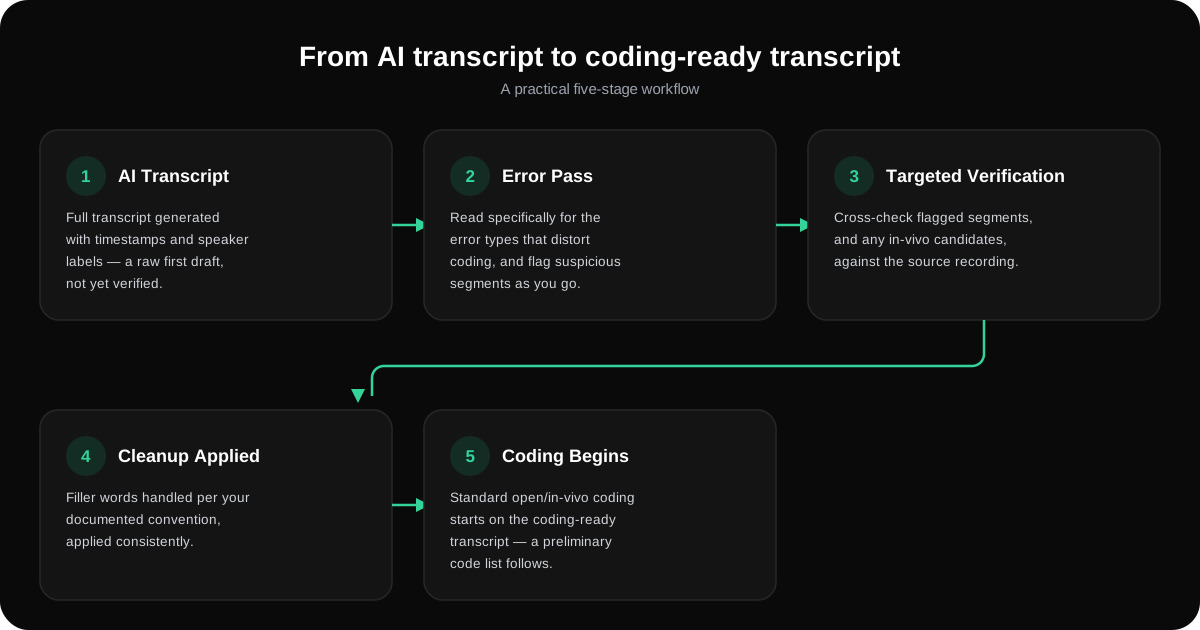
From AI transcript to coding-ready transcript: a practical workflow
| Stage | What happens | Output |
|---|---|---|
| 1. AI transcript | Full transcript generated with timestamps and speaker labels | Raw first draft, not yet verified |
| 2. Transcription-error pass | Read specifically for the error types above; flag suspicious segments | Annotated transcript with flagged segments |
| 3. Targeted verification | Cross-check flagged segments (and any in-vivo candidates) against the source recording | Corrected, verified segments |
| 4. Cleanup decision applied | Filler words handled per your documented convention, applied consistently | Coding-ready transcript |
| 5. First-cycle coding begins | Standard open/in-vivo coding, per the general coding workflow | Preliminary code list |
Stage 3 is the one worth protecting time for — it's the step most likely to be skipped under deadline pressure, and the step where an uncaught error actually reaches your codebook.
What AI transcription actually accelerates
Being specific here matters, because it's easy to either overclaim or underclaim what AI transcription changes. What it reliably speeds up: producing a first-draft transcript at all (versus manual transcription, which is genuinely slow), giving you a timestamped, searchable, editable document to work from, and — where a tool provides one — an early structured overview that helps you orient to a long interview before you start close reading. YumiLM's Insight Guide is that kind of overview: a structured summary with a premise, timestamped sections, and highlighted moments, generated from the transcript. It's useful for orientation before you start coding — it is not a substitute for coding, and it doesn't perform qualitative analysis itself.
What still requires researcher judgment
Everything downstream of "does this transcript accurately represent what was said" is unchanged by AI transcription: deciding which analytic approach fits your research question, building and refining a codebook, judging whether two codes should be collapsed, running inter-coder reliability, and interpreting what a pattern of codes actually means. AI transcription changes how fast and cheaply you get to a usable transcript. It does not change what happens after that. If your study involves multiple coders, Inter-Coder Reliability for AI-Generated Transcripts covers how the verification steps in this guide — consistent speaker boundaries, a documented cleanup convention — feed directly into whether a reliability check like Cohen's Kappa is measuring genuine agreement or just transcript inconsistency.
Quality-control checklist before you start coding
- Speaker boundaries spot-checked against the audio, especially around overlapping or rapid-turn segments
- Every segment flagged during the error pass resolved — verified, corrected, or explicitly marked uncertain
- Cleanup convention (verbatim vs. cleaned) decided once and documented, not applied inconsistently
- Any segment you plan to in-vivo code verified word-for-word against the recording
- Uncertain/inaudible segments marked rather than guessed
- A short prep log kept — what was corrected, and why — so the gap between "AI output" and "coded transcript" is part of your audit trail, not invisible
Once a transcript clears this checklist, it's ready for the general coding workflow: How to Analyze Interview Transcripts picks up from here. If you're moving toward a specific named method rather than a general coding pass, see Thematic Analysis with AI-Generated Transcripts for the same preparation problem applied to Braun and Clarke's six-phase approach.
Sources
- The SAGE handbook of qualitative data analysis (excerpt)
- A practical guide for conducting qualitative research in medical education: Part 2 — Coding and thematic analysis - PMC
Recommended
- How to Analyze Interview Transcripts | YumiLM
- Thematic Analysis with AI-Generated Transcripts | YumiLM
- Inter-Coder Reliability for AI-Generated Transcripts | YumiLM
- Verbatim Transcription Accuracy for Interviews | YumiLM
- Transcribe Interviews Faster: A Research-Ready Workflow | YumiLM
- AI Transcription Guide | YumiLM