
Meeting Minutes vs. Transcript: Which Do You Need?
By the YumiLM Team
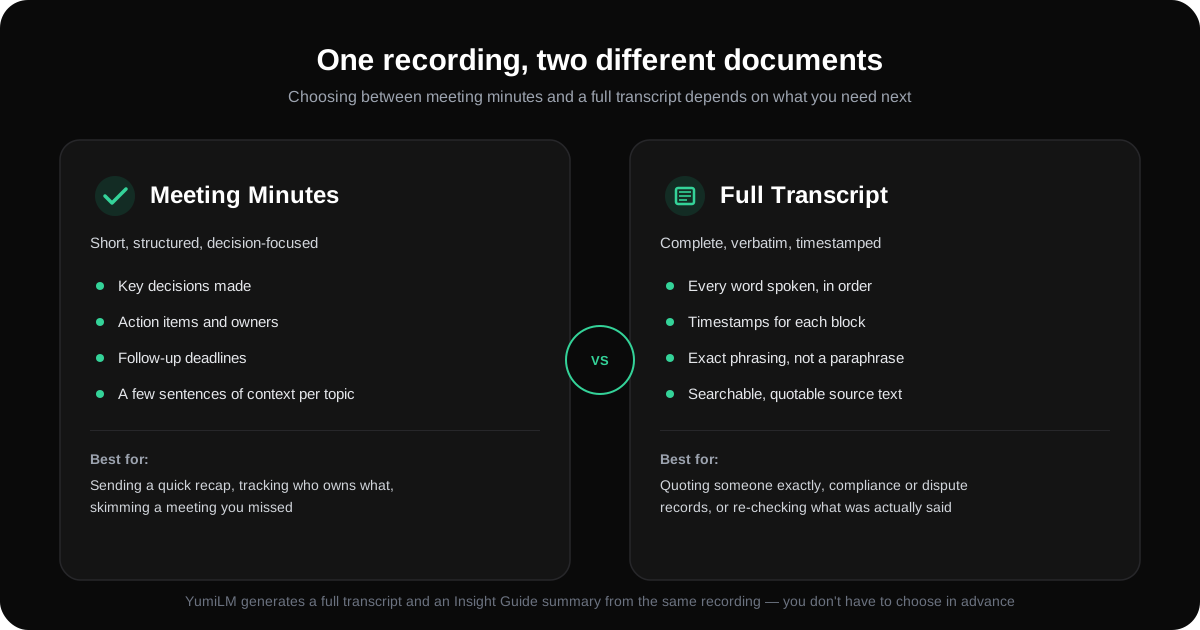
They come from the same recording, but they're not the same document. Meeting minutes are a short, structured summary of what was decided and who's doing what next. A transcript is the complete, word-for-word record of everything that was said. Confusing the two is the most common reason someone ends up with the wrong deliverable — chasing down an exact quote inside a two-paragraph recap, or scrolling through forty pages of verbatim text looking for the one decision that mattered.
This guide walks through what actually separates the two, when each one is the right call, and how to get both from a single recording without deciding in advance which one you'll need.
Key Takeaways
| Point | Details |
|---|---|
| Different purpose, not different quality | Minutes aren't a "lighter" transcript — they're a different document built to answer a different question (what do we do next vs. what exactly was said). |
| Minutes are written for people who weren't there | A transcript assumes the reader already has context; minutes are built to stand alone for someone catching up. |
| Transcripts are the only source you can quote from | If wording matters — a commitment, a number, an exact phrasing — only the transcript preserves it exactly. |
| You don't have to choose before the meeting | The same recording can produce both a transcript and a structured summary; the decision is really about which one you read first. |
| Minutes go stale faster | A decision summarized in minutes can be misremembered or restated wrong down the line; the transcript is the record you fall back on to check. |
Table of Contents
- What meeting minutes actually are
- What a transcript actually is
- The real differences, side by side
- When you need minutes
- When you need the transcript
- When you genuinely need both
- How YumiLM gives you both from one recording
- Frequently Asked Questions
- Sources
What meeting minutes actually are
Meeting minutes are a condensed, structured record built around outcomes, not conversation. A well-written set of minutes typically covers:
- The decisions that were made.
- Action items, each with an owner and (ideally) a deadline.
- Follow-up items or open questions carried to the next meeting.
- A sentence or two of context per topic — enough for someone who missed the meeting to understand why the decision was made, not just what it was.
What minutes deliberately leave out is everything else: the back-and-forth that led to a decision, tangents, restated points, and most of the actual language people used. That's not a flaw — it's the format doing its job. Minutes are meant to be read in two minutes by someone who wasn't in the room.
What a transcript actually is
A transcript is the opposite design choice: completeness over brevity. It's every word spoken, in the order it was spoken, usually broken into timestamped blocks so you can jump to a specific moment. Nothing is summarized, paraphrased, or left out because it seemed unimportant at the time — which matters, because what looks unimportant in the room sometimes turns out to be the exact detail someone needs later.
A transcript doesn't editorialize. It doesn't tell you what mattered. That's precisely what makes it useful as a source of record — and precisely why it's the wrong document to hand someone who just wants to know what they missed.
The real differences, side by side
| Meeting Minutes | Full Transcript | |
|---|---|---|
| Length | Short — often under a page | Long — proportional to meeting length |
| What it captures | Decisions, action items, key context | Every word, in order |
| Reading time | A couple of minutes | Can take as long as the meeting itself |
| Best for | Recapping, assigning follow-up, catching up fast | Quoting exactly, checking a record, resolving a dispute about what was said |
| Risk if you use the wrong one | Missing the exact wording you actually needed | Wasting time hunting for the one decision buried in pages of conversation |
When you need minutes
Minutes are the right call when the question is "what do we do now," not "what exactly was said." That covers most day-to-day cases:
- Sending a quick recap to the team right after the meeting.
- Tracking who owns which follow-up item and by when.
- Catching up someone who missed the meeting, without asking them to read a transcript.
- Keeping a running record of decisions across a series of recurring meetings (a project's weekly standup, for example), where the pattern of decisions matters more than any single meeting's exact dialogue.
When you need the transcript
Reach for the transcript specifically when precision matters more than speed:
- You need to quote someone exactly — a commitment, a figure, an exact phrase — not a paraphrase of what they meant.
- There's a disagreement about what was actually said or agreed to, and you need the record to check.
- You're building documentation, a report, or research notes where losing detail to summarization would be a real problem.
- You want to search the full conversation for something specific that minutes wouldn't have flagged as important at the time (a passing comment that turned out to matter later).
When you genuinely need both
The honest answer, most of the time, is that you want minutes to read first and the transcript on hand as a fallback — not one or the other permanently. Minutes get you moving quickly; the transcript is what you check when something in the minutes is disputed, unclear, or needs an exact quote pulled from it. Treating them as a pair rather than a choice avoids the two most common failure modes: relying on a summary for something that needed exact wording, or making everyone read a full transcript for something a two-minute recap would have covered.
How YumiLM gives you both from one recording
You don't have to pick one before the meeting starts. YumiLM generates a full, timestamped transcript and a structured Insight Guide — a summary built around premise, key points, and conclusion — from the same recording, whether it's captured live or uploaded afterward. In practice, that means:
- The Insight Guide functions like a well-organized set of minutes: the key points and conclusion are exactly what you'd send someone who missed the meeting.
- The full transcript stays available underneath it, timestamped, for the moments you need to check exact wording or pull a precise quote.
- Both come from a single pass — you're not re-processing the recording or choosing a "summary mode" upfront and losing the detail if you guessed wrong.
Export either one to PDF, or keep working in the editable transcript. For live calls, see Live Meeting Transcription; if you already have a recording to upload and turn into notes, see Turn a Meeting Recording Into Notes You Can Actually Use for the step-by-step workflow.
Frequently Asked Questions
Are meeting minutes just a shorter transcript? No — they're built around a different goal. A transcript captures everything that was said; minutes capture what was decided and what happens next. Minutes leave out most of the actual conversation on purpose, not because of a length limit.
Can I turn a transcript into minutes myself? Yes, by reading through it and pulling out decisions and action items — but that's manual work that scales badly for long or frequent meetings, which is exactly what a structured summary tool is built to automate.
Which one should I send to someone who missed the meeting? Minutes, in almost every case. A transcript assumes the reader already has context for the conversation; minutes are written to stand alone for someone catching up.
Does YumiLM label who said what in the transcript? No — YumiLM's transcript is sequential timestamped text in recording order, without speaker labels or role identification. If you need to know exactly who said a specific line, cross-reference the timestamp against your own memory of the call or a separate note taken during the meeting.
Is the transcript still useful once I have the minutes? Yes — keep it as the record you fall back on. Minutes summarize; if a decision gets misremembered or restated incorrectly weeks later, the transcript is what settles it.
Sources
- Meeting Minutes vs Transcripts: What's the Difference?
- Meeting Minutes vs. Transcripts: Which One Do You Actually Need?
- Meeting Minutes vs Transcription: Key Differences