
Summarize Podcasts: AI Summaries and Transcripts
By the YumiLM Team

A practical way to summarize a podcast episode is to paste a supported video URL, such as a YouTube link, or upload the audio file into an AI transcription tool, generate a clean transcript using automatic speech recognition (ASR), then extract a TL;DR, timestamped highlights, and speaker-labeled quotes. Tools like YumiLM go further, turning that transcript into a structured Insight Guide you can export as a PDF, share as an SRT subtitle file, or translate into another language.
This guide is about getting a quick summary of an episode's content. If you're the one producing the show and need a formatted, publishable show-notes page instead, see Podcast Show Notes From a Transcript.
Key Takeaways
Summarizing podcasts with AI means turning long audio into searchable transcripts, timestamped quotes, and structured notes you can actually use, not just a shorter version of what you heard.
| Point | Details |
|---|---|
| Start with a supported URL or file | Paste a YouTube link, or upload an audio file, to begin the workflow. |
| Expect a transcript first | A timestamped, speaker-labeled transcript is the foundation; the summary comes from it. |
| Match output to your need | Use TL;DRs for quick scans, Insight Guides for research, SRT files for subtitles. |
| Check for red flags | No transcript access, no timestamps, and opaque data retention are signs to look elsewhere. |
| YumiLM for structured output | YumiLM combines transcription, Insight Guides, SRT, PDF, and translation in one workflow. |
Table of Contents
How do you summarize a podcast episode step by step?
The workflow is shorter than most people expect. Here it is in order:
-
Fetch the episode. Paste a supported video URL, such as a YouTube link, into your tool of choice. Alternatively, upload an MP3, MP4, WAV, or M4A file directly. For podcast episodes on platforms like Spotify or Apple Podcasts, use a downloadable audio file when you have the rights to use it instead of assuming the platform link can be transcribed directly.
-
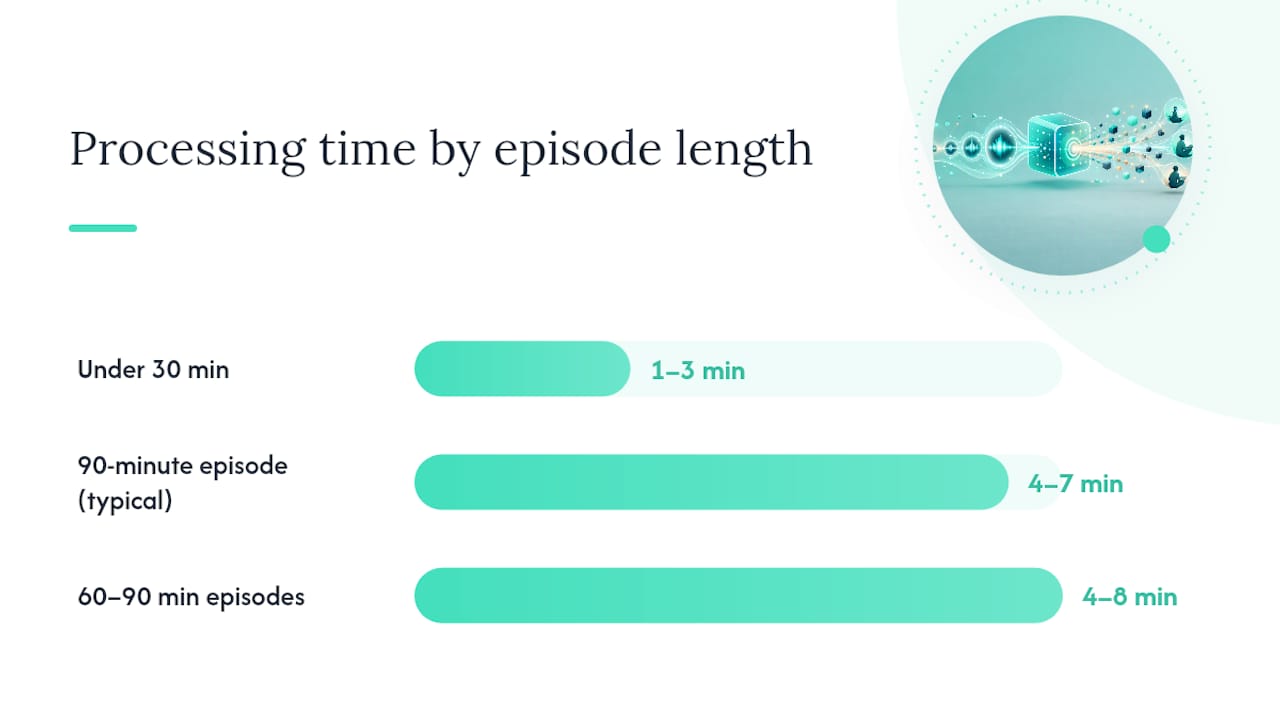
Run transcription (ASR). The tool sends the audio through a speech-to-text engine. Processing time depends on episode length, audio quality, file size, and server load.
-
Skim the transcript and generate a TL;DR. Once the transcript is ready, request a short summary. Most tools let you choose length: one sentence, a short paragraph, or 3–5 bullet takeaways.
-
Request timestamps, speaker labels, and quotes. Ask the tool to attach timestamps to key moments and label each speaker. This is where speaker diarization pays off: you can pull a quote and know exactly who said it and when.
-
Export. Download a PDF of the Insight Guide, grab the SRT subtitle file, copy the plain-text transcript, or export a translated version. For file uploads and structured exports, YumiLM handles these outputs in one workflow.
Turnaround time at a glance: shorter, cleaner episodes usually process faster than long, noisy, or uncompressed files. Large uncompressed files take longer than compressed MP3s at the same duration.
Pro Tip: Before you hit "generate," add a focus prompt. "Summarize for study notes" produces a different output than "summarize for marketing highlights." The more specific the prompt, the more useful the output.
How does AI podcast summarization actually work?
The pipeline has four distinct stages, and knowing them tells you exactly where errors creep in.
Audio retrieval is first. The tool fetches the audio from a supported URL or uploaded file and converts it to a format the ASR engine can process. Quality drops here if the source audio is compressed, noisy, or recorded at a low bitrate.
Speech-to-text (ASR) converts the audio waveform into a raw word sequence. Modern ASR engines like WhisperX handle multiple languages and produce word-level timestamps, which is what makes accurate timestamping possible downstream. Accuracy is high for clear, studio-quality audio and drops noticeably for heavy accents, overlapping speakers, or background music.
Speaker diarization segments the transcript by speaker. The system clusters audio segments by voice characteristics and assigns labels ("Speaker 1," "Speaker 2," or named labels if you provide them). Diarization struggles when two speakers have similar vocal qualities or when they talk over each other.
Summarization is the final stage, and it comes in two forms:
-
Extractive summarization pulls verbatim sentences or phrases directly from the transcript. The output reads like a highlight reel of exact quotes. Good for citation-ready notes.
-
Abstractive summarization generates new sentences that synthesize the content. The output reads like a human wrote a summary after listening. Better for TL;DRs and narrative overviews.
A practical note: punctuation and capitalization in raw ASR output are often inconsistent, especially for proper nouns and technical terms. Most tools apply a post-processing pass, but you should still spot-check any quote you plan to publish. Language support varies widely; English, Spanish, French, German, and Portuguese are broadly supported, while less common languages may produce noticeably lower accuracy. For a deeper look at ASR options and diarization settings, the YumiLM transcription guide covers the technical specifics.
What outputs can you get from a podcast summary tool?
The output format matters as much as the summary itself. Different use cases call for different formats.
Common outputs:
-
TL;DR (1–3 sentences): fastest scan, good for deciding whether to listen to the full episode
-
Bullet takeaways (3–5 points): the format most readers expect, as shown by the human-written examples at Podcast Notes, which publishes concise highlight-style summaries across hundreds of shows
-
Full timestamped transcript: essential for research, legal review, or any use case requiring exact wording
-
Speaker-attributed quotes: pulls specific lines with speaker labels and timestamps attached
-
SRT subtitle file: synced captions for video uploads, accessibility, or repurposing clips
-
Translated transcript: the same transcript in a second language, useful for multilingual teams or international audiences
-
Insight Guide: a structured document that organizes key concepts, examples, important moments, and a synthesis section — closer to study notes than a raw summary
-
PDF export: a formatted, downloadable version of any of the above
Matching output to use case:
| Use case | Best output |
|---|---|
| Quick episode scan | TL;DR or 3–5 bullet takeaways |
| Research or citation | Full timestamped transcript + speaker quotes |
| Video accessibility | SRT subtitle file |
| Study notes or deep review | Insight Guide + PDF export |
| Multilingual team | Translated transcript |
Export options to look for: copyable plain text, downloadable SRT and PDF, and manual editing access so you can fix ASR errors before sharing.
What should you look for in a podcast summarizer?
Not every tool delivers what it advertises. Here is a practical checklist before you commit to one.
Must-have features:
-
Multiple input methods: supported URL paste, such as YouTube, plus direct file upload (MP3, MP4, WAV)
-
Timestamped transcript, not just a summary
-
Speaker diarization with editable speaker labels
-
At least two export formats (PDF and SRT minimum)
-
Language support for your primary podcast language
-
Manual transcript editing so you can fix errors before exporting
-
Clear privacy controls and a stated data retention policy
-
Clear guidance on processing time, file limits, and supported input types
User reviews consistently flag timestamped transcripts and searchable libraries as the features that separate useful tools from frustrating ones.
Red flags to watch for:
-
No transcript access — the tool gives you a summary but hides the underlying text
-
No timestamps on the summary or transcript
-
Accuracy claims above 99% with no qualification for audio quality or accent variation
-
No mention of how long your audio or transcript data is stored
-
No speaker labels or diarization at all
-
Pricing that limits exports or charges per download
Vendor questions worth asking before you sign up:
-
How long are transcripts and audio files retained on your servers?
-
Does voice data leave your infrastructure for third-party ASR processing?
-
What file types and maximum file sizes are supported?
-
Are usage limits per month, per file, or per minute of audio?
-
Is there a free tier, and what does it actually include?
What does a good AI podcast summary look like?
Here is a fictional example of what a quality AI-generated summary could look like for a 45-minute interview episode on productivity research.
TL;DR: Researchers find that time-blocking produces measurably better focus outcomes than to-do lists alone, but only when blocks are protected from interruption and reviewed at the end of each day.
Key takeaways:
-
Time-blocking works best in 90-minute intervals aligned with natural ultradian rhythms, not arbitrary one-hour slots
-
The biggest failure mode is scheduling blocks without protecting them from meeting requests and notifications
-
End-of-day review of completed blocks is as important as the planning itself
-
Digital calendars outperform paper for time-blocking only when notifications are fully silenced during blocks
-
The guest recommends a weekly "block audit" to identify which categories of work consistently get displaced
Timestamped quote:
[14:32] — Guest (Dr. A. Mercer): "The calendar is not the system. The calendar is just where you write down the system. If you don't protect the block, you don't have a system."
This format, a short TL;DR plus scannable bullets plus one verbatim timestamped quote, is the structure that Podcast Notes has refined across thousands of human-written summaries. AI tools that replicate this structure give you something you can actually use for notes, citations, or content repurposing.
Common accuracy limits and how to improve your results
AI transcription is good. It is not perfect, and knowing where it fails saves you from publishing errors.
Common failure modes:
-
Poor audio quality (low bitrate, room echo, phone recordings)
-
Heavy regional accents or non-native speaker patterns
-
Background music or ambient noise layered under speech
-
Fast talkers who run words together
-
Two speakers talking simultaneously
-
Domain-specific jargon, brand names, or technical acronyms the model has not seen
Practical fixes:
-
Upload the cleanest audio file available, not a compressed stream rip
-
Supply speaker names and a short glossary of technical terms before running transcription
-
Choose a tighter summary length; shorter summaries have fewer places to introduce errors
-
Request "quote extraction" mode when you need exact wording rather than paraphrased highlights
-
For live recordings, use a live transcription workflow with a dedicated microphone rather than a system audio capture
Pro Tip: Spot-check timestamps on 3–4 random moments in the transcript before exporting. If the timestamps are off by more than 5 seconds, the summary's cited quotes may not match the audio. Fix the transcript first, then regenerate the summary.
Community spaces where practitioners discuss transcription workflows can also be useful for finding real-world fixes for audio quality, accents, and ASR accuracy.
How to use YumiLM to summarize a podcast episode
YumiLM's workflow is designed for this use case: long audio, structured output, and exportable results for supported inputs.
Step-by-step:
-
Go to YumiLM's YouTube transcription page and paste a YouTube URL, or go to the upload page and drop in an audio or video file.
-
Choose the available transcription and output options for your file.
-
Run transcription. YumiLM processes the audio and returns a transcript with the available structure for that file.
-
Review the transcript and correct any ASR errors before using quotes or publishing excerpts.
-
Generate an Insight Guide. This is YumiLM's structured output: organized key concepts, important moments, examples, and a synthesis section — closer to study notes than a raw summary.
-
Export. Download a PDF of the Insight Guide, grab the SRT file for subtitles, copy the plain-text transcript, or request a translated version.
Where YumiLM adds value beyond basic transcription:
-
Structured Insight Guides that organize content into study-ready sections, not just a wall of text
-
Integrated SRT export for subtitles and accessibility
-
Translation into multiple languages within the same workflow
-
Manual transcript editing before export, so you control the final output
A realistic outcome: a researcher processing an interview can move from audio to transcript, structured notes, and exportable outputs without switching between multiple tools.
Why structured summaries matter more than most people realize
The standard pitch for podcast summarization is time savings. That is real, but it undersells what structured summaries actually do.

A raw TL;DR tells you what an episode was about. A structured Insight Guide, with timestamped quotes, speaker labels, organized concepts, and a synthesis section, gives you something you can cite, search, and reuse. For a researcher, that is the difference between a note and a source. For a content creator, it is the difference between a vague memory and a quotable clip with a timestamp.
The tools that matter are the ones that treat summarization as organization, not compression. Compressing a 90-minute conversation into three sentences loses almost everything. Organizing it into a searchable, exportable document with exact quotes and timestamps preserves the content in a form you can actually work with months later.
YumiLM's Insight Guide format reflects this logic. The goal is not to replace listening; it is to make what you listened to usable.
Try YumiLM for your next podcast episode
YumiLM gives you transcription, structured Insight Guides, SRT subtitles, PDF exports, and translations in one workflow.
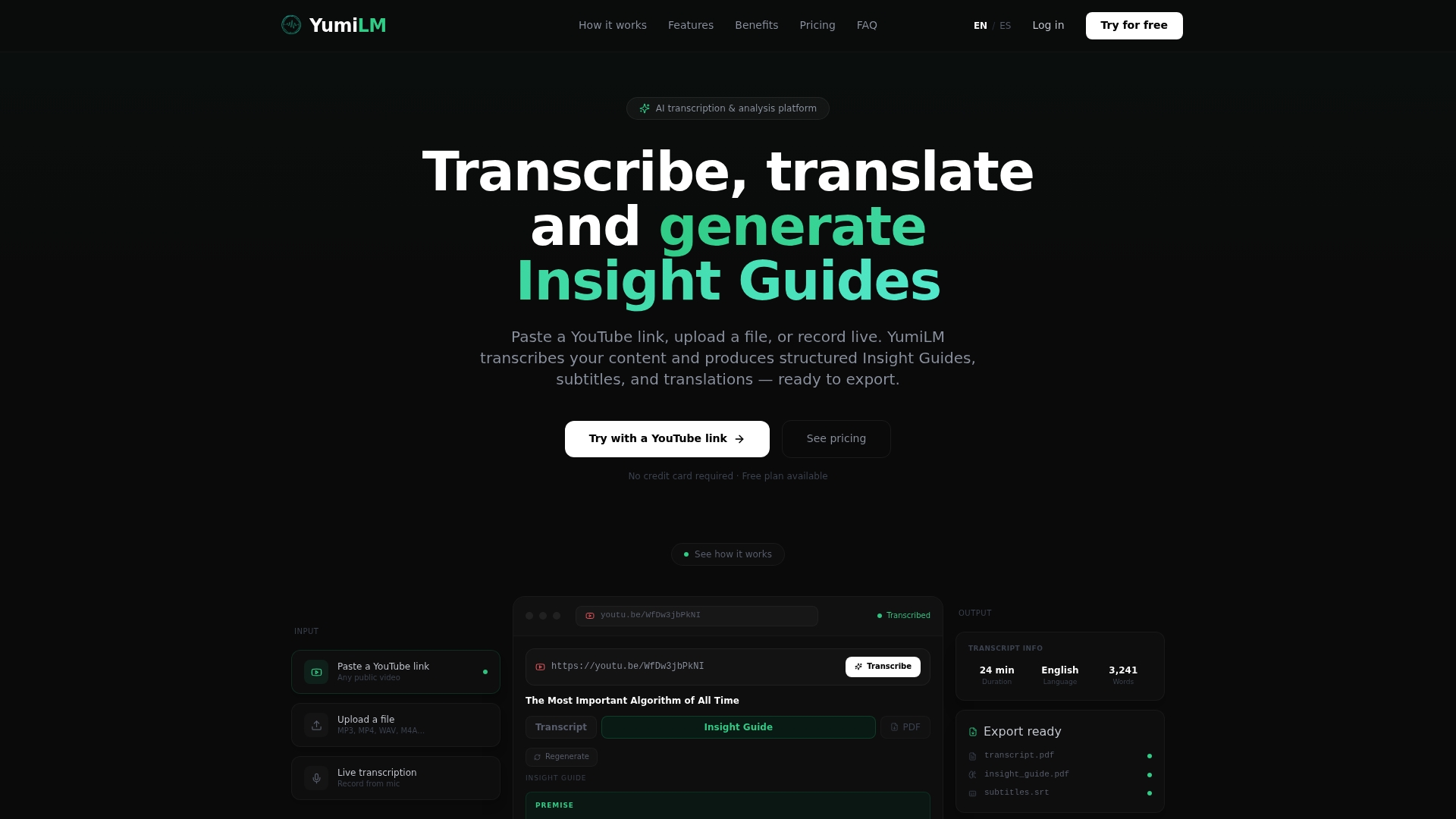
Paste a YouTube link or upload an interview file and request a short summary to see the output format. For readers who want to see the full feature set before signing up, the YumiLM transcription guide covers ASR options and export formats in detail. Ready to try it? Upload your first file and turn long audio into structured notes.